
Improving Website Performance Through Technical SEO
A technical SEO and website performance project focused on improving page speed, optimizing website assets, and creating a more efficient user experience.
Website Performance
Speed & Technical Optimization
WordPress · Elementor · WebP
Technical Optimization
Building a faster, more efficient website.
Website performance can affect both user experience and how efficiently search engines can process a website.
The project focused on identifying performance-related issues and implementing practical technical improvements without compromising the website's design or functionality.
- Page speed and performance
- Image file optimization
- Website asset efficiency
- Elementor page structure
- Mobile performance
- Technical improvements within WordPress
Performance Analysis
I used Google PageSpeed Insights to evaluate the website's performance and identify areas that could be improved.
Performance TestingImage Optimization
I optimized suitable JPG and PNG images by converting them to WebP to reduce unnecessary image weight while maintaining visual quality.
WebP OptimizationWebsite & Elementor Optimization
I reviewed the page structure and optimized elements where possible to reduce unnecessary page weight and improve the overall loading experience.
WordPress · ElementorPerformance Testing
After implementing the changes, I tested the website again using Google PageSpeed Insights to compare the performance against the original results.
Before & After TestingMeasurable improvements in website performance.
I compared the website's Google PageSpeed Insights performance before and after implementing technical and image optimization improvements.
Mobile Performance
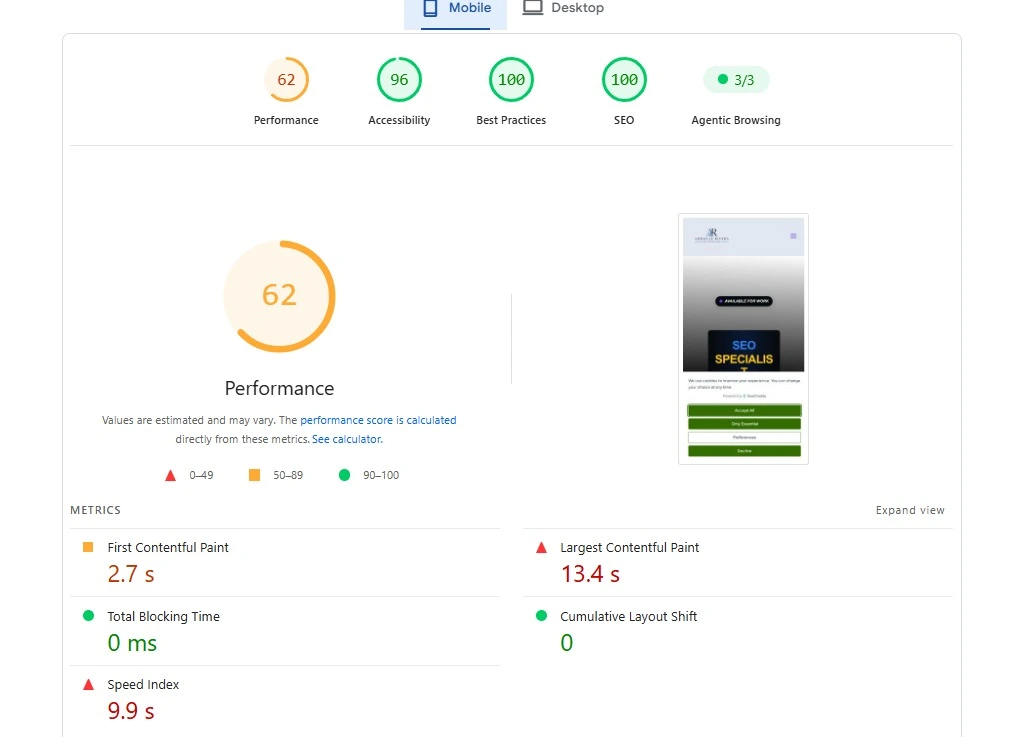
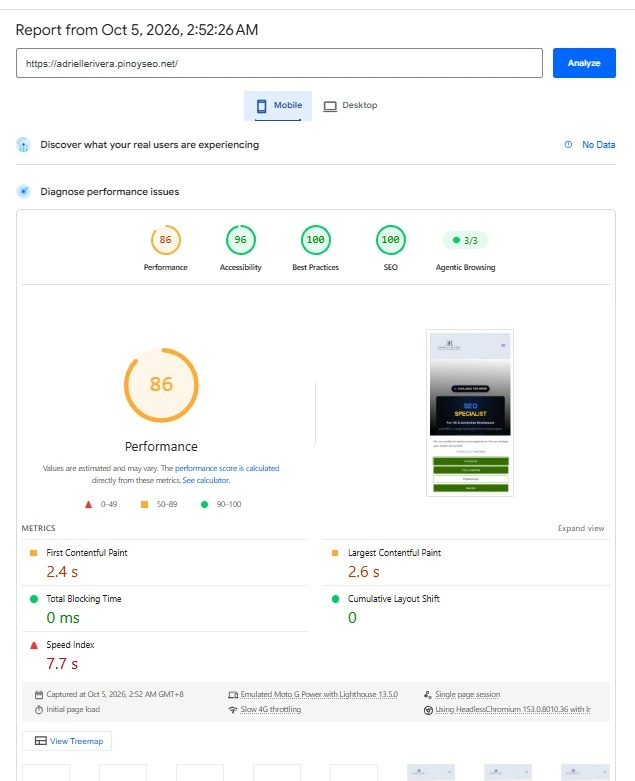
Mobile performance improved from 62 to 86.
Desktop Performance
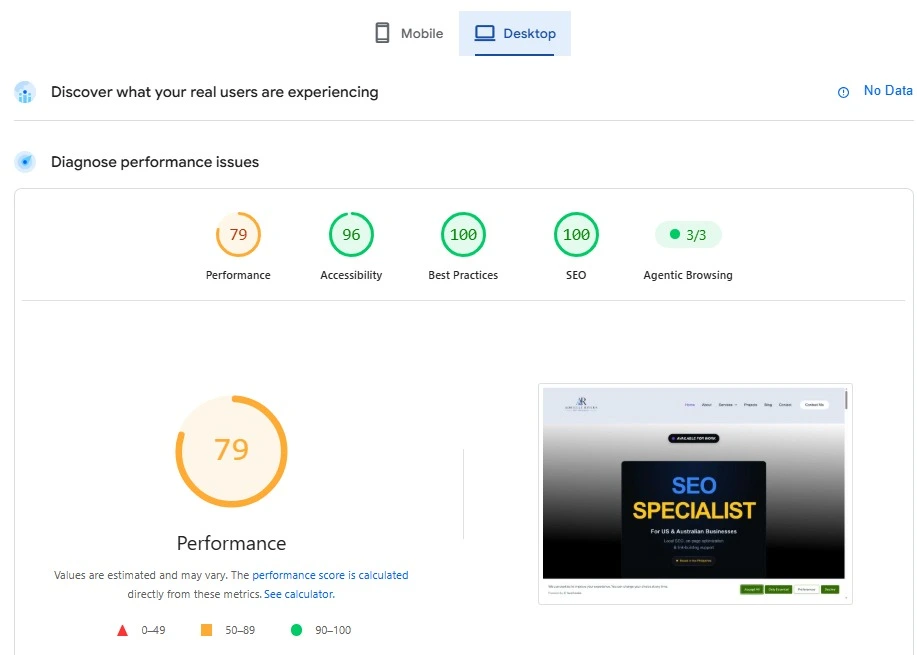
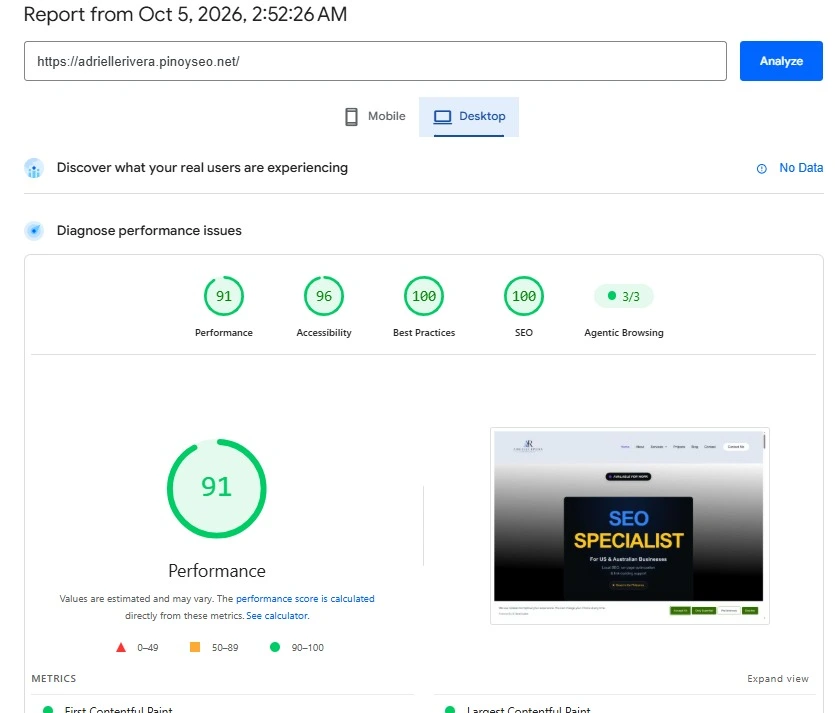
Desktop performance improved from 79 to 91.
+24 points
+12 points
Converted suitable JPG and PNG assets to WebP.
Identified and addressed performance opportunities.
Reviewed page structure and unnecessary elements.
Considered performance across smaller screens.
A more performance-focused website experience.
The optimization work resulted in a more performance-focused website, with improvements made across images, page structure, and technical implementation.
Based on the PageSpeed Insights comparisons, the website's performance score improved from 62 to 86 on mobile and from 79 to 91 on desktop.
“Technical SEO isn't only about search engines. It's also about building a website that is efficient, accessible, and easier for users to navigate.”
This project strengthened my experience in identifying website performance issues, implementing practical technical improvements, and validating changes through performance testing.
Small WordPress fixes, meaningful learning.
Alongside performance optimization, I worked on improving the author box on my WordPress website. The author image and content were not displaying as intended, so I used custom CSS to improve the layout, spacing, and presentation.
I reviewed the page before and after the changes and checked the surrounding layout to make sure the adjustments looked consistent with the rest of the website.
During the same period, I searched Google for “Adrielle Rivera” and observed my website appearing in the results. I also checked using other browsers. This was an encouraging observation, not a claim that the CSS change caused the result or improved rankings.